






Sign up for free
Features
Email API for developers
The fast, secure transactional email API you can integrate in minutes for reliable deliverability at scale.

Transactional email API with 7 official SDKs
Powerful email API for developers with advanced features that fit right into your stack and libraries for your favorite programming languages.
curl -X POST \
https://api.mailersend.com/v1/email \
-H 'Content-Type: application/json' \
-H 'X-Requested-With: XMLHttpRequest' \
-H 'Authorization: Bearer {place your token here without brackets}' \
-d '{
"from": {
"email": "your@email.com"
},
"to": [
{
"email": "your@client.com"
}
],
"subject": "Hello from MailerSend!",
"text": "Greetings from the team, you got this message through MailerSend.",
"html": "Greetings from the team, you got this message through MailerSend.
"
}'import { MailerSend, EmailParams, Sender, Recipient } from "mailersend";
const mailerSend = new MailerSend({
api_key: "key",
});
const sentFrom = new Sender("you@yourdomain.com", "Your name");
const recipients = [
new Recipient("your@client.com", "Your Client")
];
const emailParams = new EmailParams()
.setFrom(sentFrom)
.setTo(recipients)
.setReplyTo(sentFrom)
.setSubject("This is a Subject")
.setHtml("This is the HTML content")
.setText("This is the text content");
await mailerSend.email.send(emailParams);$mailersend = new MailerSend();
$recipients = [
new Recipient('your@client.com', 'Your Client'),
];
$emailParams = (new EmailParams())
->setFrom('your@email.com')
->setFromName('Your Name')
->setRecipients($recipients)
->setSubject('Subject')
->setHtml('Greetings from the team, you got this message through MailerSend.')
->setText('Greetings from the team, you got this message through MailerSend.');
$mailersend->email->send($emailParams);php artisan make:mail ExampleEmail
Mail::to('you@client.com')->send(new ExampleEmail());from mailersend import MailerSendClient, EmailBuilder
ms = MailerSendClient()
email = (EmailBuilder()
.from_email("sender@domain.com", "Your Name")
.to_many([{"email": "recipient@domain.com", "name": "Recipient"}])
.subject("Hello from MailerSend!")
.html("Hello World!
")
.text("Hello World!")
.build())
response = ms.emails.send(email)require "mailersend-ruby"
# Intialize the email class
ms_email = Mailersend::Email.new
# Add parameters
ms_email.add_recipients("email" => "your@client.com", "name" => "Your Client")
ms_email.add_recipients("email" => "your@client.com", "name" => "Your Client")
ms_email.add_from("email" => "your@domain.com", "name" => "Your Name")
ms_email.add_subject("Hello!")
ms_email.add_text("Greetings from the team, you got this message through MailerSend.")
ms_email.add_html("Greetings from the team, you got this message through MailerSend.")
# Send the email
ms_email.sendpackage main
import (
"context"
"os"
"fmt"
"time"
"github.com/mailersend/mailersend-go"
)
func main() {
// Create an instance of the mailersend client
ms := mailersend.NewMailersend(os.Getenv("MAILERSEND_API_KEY"))
ctx := context.Background()
ctx, cancel := context.WithTimeout(ctx, 5*time.Second)
defer cancel()
subject := "Subject"
text := "This is the text content"
html := "This is the HTML content
"
from := mailersend.From{
Name: "Your Name",
Email: "your@domain.com",
}
recipients := []mailersend.Recipient{
{
Name: "Your Client",
Email: "your@client.com",
},
}
// Send in 5 minute
sendAt := time.Now().Add(time.Minute * 5).Unix()
tags := []string{"foo", "bar"}
message := ms.Email.NewMessage()
message.SetFrom(from)
message.SetRecipients(recipients)
message.SetSubject(subject)
message.SetHTML(html)
message.SetText(text)
message.SetTags(tags)
message.SetSendAt(sendAt)
message.SetInReplyTo("client-id")
res, _ := ms.Email.Send(ctx, message)
fmt.Printf(res.Header.Get("X-Message-Id"))
}import com.mailersend.sdk.Email;
import com.mailersend.sdk.MailerSend;
import com.mailersend.sdk.MailerSendResponse;
import com.mailersend.sdk.exceptions.MailerSendException;
public void sendEmail() {
Email email = new Email();
email.setFrom("name", "your email");
email.addRecipient("name", "your@recipient.com");
// you can also add multiple recipients by calling addRecipient again
email.addRecipient("name 2", "your@recipient2.com");
// there's also a recipient object you can use
Recipient recipient = new Recipient("name", "your@recipient3.com");
email.AddRecipient(recipient);
email.setSubject("Email subject");
email.setPlain("This is the text content");
email.setHtml("This is the HTML content
");
MailerSend ms = new MailerSend();
ms.setToken("Your API token");
try {
MailerSendResponse response = ms.emails().send(email);
System.out.println(response.messageId);
} catch (MailerSendException e) {
e.printStackTrace();
}
}
Your first email, sent in minutes
Sign up and test immediately with our free email API and sandbox domain. Create an API key, grab the code snippet, and send your message. No extra steps, no credit card.

The uptime your apps need
MailerSend is built for reliable uptime, with a 99.5% SLA and 100% track record, so your password resets, OTPs, and confirmations always arrive. Check uptime on our live system status page.
More ways to build

CLI
Manage domains, send emails, and create webhooks from the terminal. Scriptable and CI-friendly.
Learn more

Hosted MCP
Connect Claude, VSCode, Cursor, ChatGPT or Gemini CLI. Let your AI agent send emails, manage domains and more.
Learn more

Full OpenAPI spec
Explore the API interactively on SwaggerHub. Try endpoints, see responses, and copy working requests straight into your code.
Learn more
Get started now
Sign up for free to try out MailerSend with a sandbox domain.
Monitoring & debugging made easy
-
![]() Learn more
Learn moreAPI and SMTP logs
Get full visibility into every send: capture each request and response with logs, so if something breaks, you can trace the problem in seconds. -
![]()
Real-time activity
Catch issues faster with real-time activity for every email you send. See every bounce, deferral, spam complaint and more. -
![]() Learn more
Learn moreWebhook events
Webhooks push delivery, open, bounce, and complaint events straight to your endpoints in real time, so you can react instantly.


There's an endpoint for that
From setup to send, make the most of the transactional email API service with endpoints you can use to optimize every stage of your workflow.

Send order confirmations, password resets, OTPs and more.

/bulk-email
Send service updates, event reminders, and account summaries.

/activity
Create custom dashboards or integrate activity metrics into other apps.

/analytics
Automate reports, pull data into internal tools, or trigger conditional logic.

/domains
Automate domain setup and get an overview of active domains.

/inbound
Manage inbound routes and create user-specific routes on signup.

/recipients
Share recipient data across tools to sync contacts and manage suppressions.

/templates
Send with email templates that look professional and contain dynamic content.

/email-verification
Configure forms to perform real-time email validation or verify a whole list.

/sms
Send appointment reminders, 2FA messages, shipping updates and more.

/smtp-users
Programmatically create SMTP users during environment setup.

View more endpoints
Integrations
Connect MailerSend to the tools you already use, no custom integration to build or maintain. Our official connectors keep your stack in sync so you can skip the glue code and ship instead.

Emails that make it to the inbox
Our powerful, secure infrastructure, reputation management, and premium IPs ensure your messages skip the spam folder and reach recipients for reliable email delivery every time.

Built-in deliverability tools
Protect your sender reputation end to end: Monitor blocklists, track domain activity with DMARC reporting, and verify email addresses without extra tools.

Process incoming messages
Use inbound routing to parse incoming emails to your app. Enable email-based functionality, optimize support workflows, and let users post replies, comments and messages.

Build, personalize, send
Save time on template creation with 3 email builders: drag & drop, HTML, and rich-text. Make a single template work for thousands of recipients with personalization variables.

Automated DNS configuration
Add your domain and we’ll do the rest. Auto DNS configuration detects your provider and automatically configures SPF, DKIM and DMARC authentication records.
Straightforward plans to fit your needs
Get 500 emails/month free and upgrade for as little as $7.

3 simple tiers
From side hustles and SMBs to enterprises and agencies, our plans are designed to give you the volume and features you need.
Volume-based pricing
The more you send, the lower your per email cost. Start on a plan that fits today and scale up as your business grows.

Customize your plan
Pay for what you need, when you need it, with plan customization options for extra domains, data retention, email verification, and more.
Here’s what developers say about MailerSend
MailerSend is extremely easy to use and super fast to set up. I was able to send the first email via the API in minutes. With the predefined templates and drag and drop editor, you're able to get started really quickly.

Tobias R.
IT company owner
Integrate emails in your stack now
Use our email API to start sending emails from your apps. Get started with 500 free emails per month and get more emails for as little as $7/month.


Send an email from the trial domain

Try out the features & check your activity
Frequently asked questions
What is MailerSend?
MailerSend is a transactional messaging service provider that offers a powerful email sending API and SMTP relay, built so that developers can integrate transactional email sending into their stack quickly and easily.
Can I send email marketing campaigns through MailerSend?
While you could send marketing emails with the email API, the MailerSend platform is built for transactional emailing. To get the best performance and deliverability for both marketing and transactional email campaigns, we recommend keeping them separate. We offer SSO capability with MailerLite, so you can connect and use a single account for both your marketing emails and transactional emails while still keeping them separate.
Can I get a dedicated IP address?
Dedicated IPs are available for high-volume senders. Get in touch with us to find out if a dedicated IP is right for you.
Can I use the API from an AI agent or MCP-compatible tool?
MailerSend’s hosted MCP allows you to connect your MailerSend account to Claude, VSCode, Cursor, ChatGPT and Gemini CLI, so you can send emails, manage domains, create webhooks, and more from your AI coding environment.
Do you also offer an SMS API?
Yes! Our easy-to-use SMS API allows you to send high-volume, toll-free SMS within the U.S. and CA. Availability in more regions is on the way.
How does MailerSend pricing work?
Pricing is based on the number of emails you send. Our Free plan includes 500 emails and you can upgrade for as little as $7/month to get more emails and features.
Our cost-effective Hobby plan includes 5,000 emails/month with additional emails charged at $1.50/1,000 and the Starter plan is available for up to 500,000 emails/month, with additional emails charged at decremental rates starting at $1.30/1,000. In comparison, the Professional plan is available for up to 2,000,000 emails/month, with the charge for additional emails starting at $1.30/1,000. If you need more than 2,000,000 emails, you can talk to us about a custom Enterprise plan.
Can I send emails via SMTP (Simple Mail Transfer Protocol)?
Yes, we have a plugin available if you wish to send emails through our SMTP service, although we recommend using the email API for more advanced functionality.
How does the MailerSend CLI work?
The MailerSend CLI lets you interact with your MailerSend account straight from the terminal. Once you install it, you authenticate with your API key and then run commands to manage your email setup. Because it’s scriptable, you can also drop CLI commands into your setup scripts or CI pipeline to automate tasks.
Explore all features
All the latest features designed to help you collaborate on transactional emails and work smarter.
 Powerful RESTful API service

Start sending and tracking your emails with our easy API integration process and clean documentation.
Email verification

Verify a single email address or upload an entire email list to verify in bulk.
Webhooks
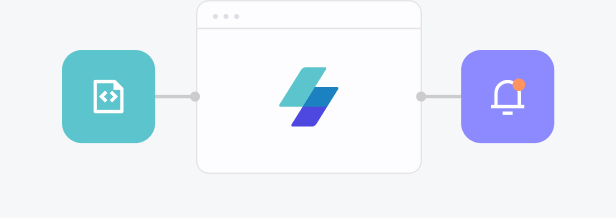
Get notified of email events to trigger automatic reactions.
Email activity & analytics
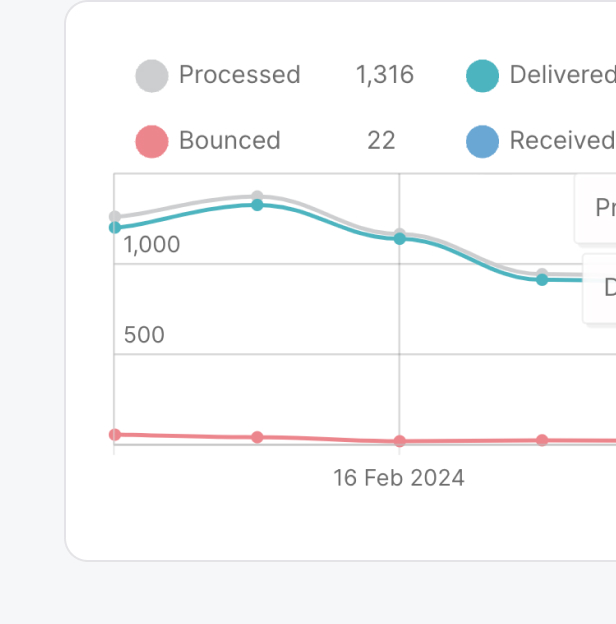
View your email activity in real-time to gain insights and make adjustments when needed.
Email inbound processing

Automatically parse incoming emails. Inbound email routes enable MailerSend to receive emails on your behalf, integrating them into your application.
Dynamic email templates

Build one-to-one customer relationships on a mass scale using a single email template.
And much more to deliver, every single time
